
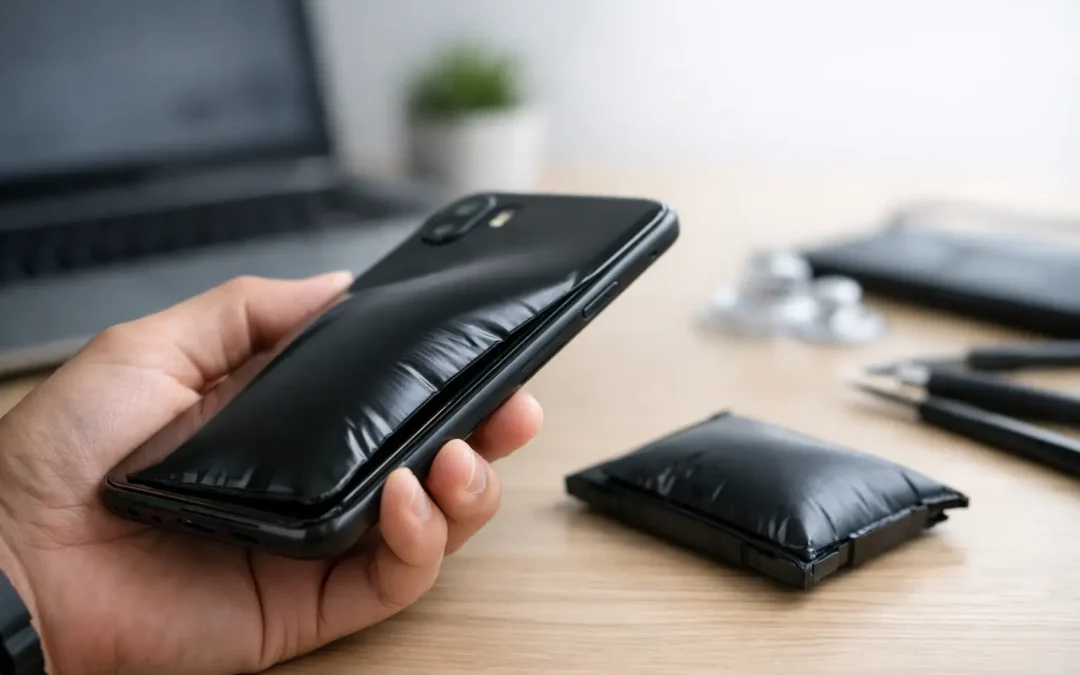
A phone that suddenly feels thicker, rocks on a table, has a lifting screen, or no longer fits its case is not dealing with a cosmetic issue. Phone battery swelling is a warning that the battery inside has failed and may no longer be safe to use. Your first move should be simple: stop charging it, stop using it, and keep it away from heat, pressure, and anything flammable.
A swollen battery can happen in an iPhone, Samsung Galaxy, iPad, tablet, laptop, or almost any rechargeable device. It is unsettling, but you do not need to guess your way through it. Knowing what to look for and what not to do can protect your device, your data, and your home.
What Phone Battery Swelling Looks Like
Most lithium-ion batteries are thin and flat when they are healthy. When one swells, gases build up inside its sealed pouch and push outward. That pressure often shows up somewhere you can see or feel.
The most common sign is a screen that is separating from the frame. You may notice a gap around the edge of the display, especially near the bottom or sides. On phones with a back glass panel, the rear cover may begin to lift instead. The phone can also feel unusually warm, wobble when laid face-up on a desk, or become difficult to press together in a protective case.
Do not assume a lifted screen is only a broken adhesive issue. A drop can loosen a display, but a screen that slowly rises without a recent impact deserves immediate attention. If the screen is lifting and the phone is also draining quickly, heating up, or shutting down unexpectedly, a failing battery is a likely cause.
Why a Phone Battery Swells
Battery swelling happens when the internal chemistry of a lithium-ion battery breaks down. Age is a frequent factor. Every charge cycle wears the battery a little, and eventually the internal materials can degrade enough to produce gas.
Heat speeds up that damage. Leaving a phone in a hot Houston vehicle, charging it under a pillow, using it heavily while plugged in, or exposing it to direct summer sun can shorten battery life. Heat does not guarantee that a battery will swell, but it puts extra stress on a component already working hard.
Physical damage and water exposure can also contribute. A phone may look fine after a drop or a splash, while internal damage begins affecting the battery over time. Low-quality charging accessories, a damaged charging port, and an incorrect replacement battery can create problems as well. In some cases, a battery simply has a manufacturing defect and fails earlier than expected.
It depends on the device and its history, but one thing stays consistent: a swollen battery is not something to monitor for another few weeks. It needs to be removed and replaced by a trained technician.
What to Do When You Notice Phone Battery Swelling
If your phone is on, power it down if you can do so without pressing on a bulging screen or forcing the device closed. Unplug it from the charger immediately. Do not continue charging it just long enough to back up photos, finish a call, or get through the workday.
Place the phone on a hard, nonflammable surface in a cool, dry area away from children and pets. A bare tile floor, concrete surface, or metal tray is better than a bed, couch, carpet, vehicle, or kitchen counter near paper towels and cooking oils. Do not put it in a sealed container. A damaged battery needs ventilation and should not be compressed.
If the device is very hot, smoking, hissing, leaking, or giving off a strong chemical smell, move away from it and call emergency services. Do not handle a smoking or burning battery. Water may not be the right response to every battery fire, so let trained emergency responders take over.
For a device that is swollen but stable, arrange a professional inspection as soon as possible. A repair shop can safely open the device, remove the damaged battery, inspect the display and frame for pressure damage, and install a quality replacement when repair makes sense.
Do Not Press the Screen Back Down
This is the mistake technicians see most often. The screen may look like it just needs to snap back into place, but pressing it down can puncture the battery underneath. A punctured lithium-ion battery can catch fire quickly.
Do not use clamps, tape, rubber bands, or a tight case to force the phone flat. Do not poke the battery, bend the device, place it in a freezer, or try to drain the battery to zero. None of these steps fixes the failure. They only increase the risk.
Can You Keep Using a Swollen Phone?
No. Even if the phone still turns on and seems normal, continued use adds risk. Charging creates heat. Gaming, video calls, navigation, and mobile hotspot use create more heat. Carrying the phone in a pocket or bag can put pressure on the damaged battery, especially if the screen or back panel is already separating.
There is also a practical repair concern. The longer a swollen battery remains inside a phone, the more likely it is to damage other parts. Pressure can crack an OLED display, warp the frame, damage fingerprint or Face ID-related components, and strain delicate cables. Replacing a battery promptly may prevent a straightforward repair from becoming a display repair or full device replacement.
If you need your information, tell the repair technician. In many cases, data can remain intact during battery service. But safety comes before a last-minute backup attempt. Do not charge or manipulate a swollen phone just to retrieve files.
Is It Better to Repair or Replace the Device?
That decision usually comes down to the phone’s age, overall condition, and the extent of battery-related damage. A newer phone with a healthy screen and no major liquid or frame damage is often a strong candidate for battery replacement. It can restore reliable daily use without the cost of purchasing a new device.
Replacement may be the better value if the phone has multiple issues, such as a cracked screen, severe frame bending, charging problems, or water damage. It may also make sense when an older model no longer receives useful software support or cannot meet your work, school, or family needs.
A technician should inspect the device before making that call. The screen can look intact from the outside but have damage where battery pressure has pushed against it. At Phone Repair Ambulance, a local technician can assess the battery, check for related damage, and give you a clear repair recommendation without making you decode technical jargon.
How to Reduce the Chance of Future Battery Swelling
No rechargeable battery lasts forever, but good habits can reduce unnecessary stress. Keep your phone out of extreme heat whenever possible, particularly inside parked cars. Use a charger and cable that are in good condition and designed for your device. If your charging port is loose, overheats, or only works at a certain angle, have it checked instead of forcing the connection.
Avoid charging on soft surfaces that trap heat. A nightstand is better than a mattress, and open airflow is better than a phone buried under blankets. If your device regularly becomes hot while charging, remove the case temporarily and stop using power-hungry apps until it cools down.
Battery health features on newer phones can help manage charging patterns, but they cannot reverse a battery that has already begun failing. Watch for early changes: unexplained heat, rapid battery drain, shutdowns at higher percentages, or a case that suddenly feels too tight. Catching a failing battery early can save the screen and keep the repair simpler.
A lifted screen is never a problem to tape over and forget. Set the phone down, stop charging it, and get it checked before a small battery issue turns into an unsafe situation or a much more expensive repair.